
Most agency growth guides offer the same financial equation: calculate your manual reporting costs, buy an automated reporting tool, and watch your billable hours magically return. If you have 50 clients and each monthly report takes 2.5 hours of manual data entry, you are burning through substantial resources just to copy and paste numbers into spreadsheets.
But there is a massive trap hiding inside 100% automated reporting. When you shift entirely to hands-off, scheduled dashboards, you inadvertently remove the most critical touchpoint in your agency-client relationship. Uncontextualized data feeds do not prove your value; they simply shift the burden of data analysis onto the client.
To achieve sustainable client retention, your automation stack must be paired with structured human analysis. Over the past 12 months, I personally overhauled the client onboarding and reporting workflow at our agency, shifting completely away from fragmented spreadsheets to an integrated automated system.
The strategy laid out below does not just save time. It transforms your monthly reporting from an administrative chore into a high-leverage client retention asset.
The Hidden Cost of Manual Data Silos

Most early-stage agencies begin by piecing together a fragile web of free tools. They pull organic traffic data from Google Search Console, paid performance from ad managers, and conversion metrics from analytics platforms. This manual approach exposes your agency to three structural risks:
- Inconsistent Data Quality: Different marketing platforms define core metrics differently. A conversion event triggered within a Meta ad campaign rarely matches an ecommerce transaction ledger due to varying attribution windows.
- Delayed Insights: Manual data extraction takes time. By the time a multi-channel report is formatted, reviewed, and emailed, the performance insights are often weeks old. Clients cannot make agile budget adjustments based on historical remnants.
- Human Error: Copying raw figures across sheets introduces accidental typos, broken formulas, and mismatched columns. A single misplaced decimal point can instantly destroy years of carefully built client trust.
A benchmark study by Funnel.io revealed that only 20% of marketers report fully integrated data, while the remaining 80% struggle with fragmented tools and data silos. This fragmentation keeps account managers trapped in a cycle of chasing data rather than analyzing it.
Why 100% Automated Reports Threaten Client Retention

When agencies recognize the cost of manual processing, they usually jump to the opposite extreme. They build a hands-off dashboard, configure a recurring email schedule, and consider the job done.
This is a dangerous mistake. Automated dashboards that lack contextual commentary are a primary driver of client churn. If a client opens a white-label dashboard and sees a 15% drop in organic conversions, their immediate reaction is panic. Without an accompanying human explanation detailing why the drop occurred and how the strategy is shifting to fix it, the client begins to question your expertise.
The objective of report automation should never be to stop talking to your clients. The goal is to optimize your workflows so you can have smarter, deeper strategic conversations.
The Financial Impact of Smart Automation
Transitioning away from manual processing to structured automation yields immediate operational returns. By implementing a centralized data analytics pipeline, our agency achieved clear, measurable improvements in both efficiency and client stability over a six-month period.
- Our agency increased our client retention rate by 35% over two consecutive quarters.
- Account managers reclaimed an average of 15 billable hours per client every single month.
Instead of spending those 15 hours fighting spreadsheet formulas, our team redirected that time toward execution, proactive campaign adjustments, and personalized client communication.
Selecting Your Technical Stack: Frameworks vs. Platforms

Building an automated reporting pipeline requires choosing between two primary architectural models: Business Intelligence (BI) ecosystems or dedicated marketing automation platforms.
Choosing the wrong model can result in excessive onboarding times or data limitations. The matrix below breaks down the technical trade-offs of the dominant reporting methodologies used by modern agencies:
| Reporting Methodology | Core Technologies | Primary Advantages | Critical Disadvantages |
|---|---|---|---|
| DIY Free Stack | Google Sheets, Google Docs, Slides | No direct software licensing costs; highly familiar interface. | Extremely time-consuming; prone to manual input errors; updates are static. |
| Data Analytics Dashboards | Looker Studio, GSC API, BigQuery | Highly customizable layouts; natively handles Google ecosystem data for free. | Fragmented native connectors for non-Google ad networks; steep learning curve. |
| Business Intelligence (BI) | Tableau, Power BI | Elite processing power for massive, multi-industry big data sets. | Requires dedicated data analysts; lack of built-in marketing platform integrations. |
| Automated Platforms | AgencyAnalytics, Funnel.io | Turnkey marketing integrations; rapid deployment; built-in client tracking. | Monthly recurring SaaS fees; rigid layout templates compared to raw BI tools. |
For agencies deeply rooted in organic search and performance marketing, building a custom dashboard ecosystem via Looker Studio utilizing direct API integration and the GSC API represents the most scalable, cost-effective long-term solution. If you plan to scale these technical integrations into a standalone commercial offering, adopting an API-first business model can unlock secondary revenue streams by licensing your raw data pipelines directly to enterprise clients.
A Step-by-Step Blueprint for Human-in-the-Loop Reporting
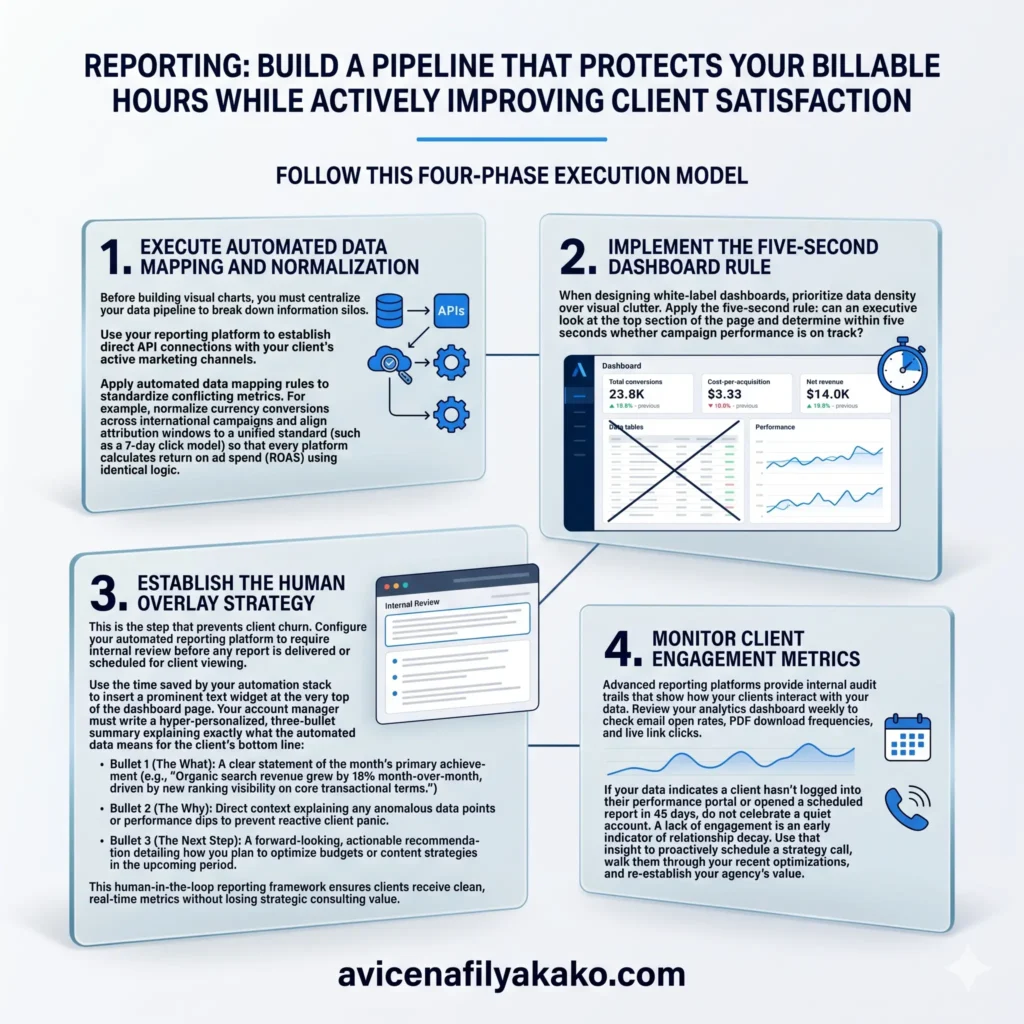
To build a pipeline that protects your billable hours while actively improving client satisfaction, follow this four-phase execution model.
1. Execute Automated Data Mapping and Normalization
Before building visual charts, you must centralize your data pipeline to break down information silos. Use your reporting platform to establish direct API connections with your client’s active marketing channels.
Apply automated data mapping rules to standardize conflicting metrics. For example, normalize currency conversions across international campaigns and align attribution windows to a unified standard (such as a 7-day click model) so that every platform calculates return on ad spend (ROAS) using identical logic.
2. Implement the Five-Second Dashboard Rule
When designing white-label dashboards, prioritize data density over visual clutter. Apply the five-second rule: can an executive look at the top section of the page and determine within five seconds whether campaign performance is on track?
- Replace dense, multi-row data tables with dynamic line charts showing performance trends over time.
- Position primary KPIs (such as total conversions, cost-per-acquisition, and net revenue) in large scorecards at the absolute top of the viewport.
- Use contrasting color indicators (green/red) to show performance changes compared to the previous period or the previous year.
3. Establish the Human Overlay Strategy
This is the step that prevents client churn. Configure your automated reporting platform to require internal review before any report is delivered or scheduled for client viewing.
Use the time saved by your automation stack to insert a prominent text widget at the very top of the dashboard page. Your account manager must write a hyper-personalized, three-bullet summary explaining exactly what the automated data means for the client’s bottom line:
- Bullet 1 (The What): A clear statement of the month’s primary achievement (e.g., “Organic search revenue grew by 18% month-over-month, driven by new ranking visibility on core transactional terms.”)
- Bullet 2 (The Why): Direct context explaining any anomalous data points or performance dips to prevent reactive client panic.
- Bullet 3 (The Next Step): A forward-looking, actionable recommendation detailing how you plan to optimize budgets or content strategies in the upcoming period.
This human-in-the-loop reporting framework ensures your clients receive clean, real-time metrics without losing the strategic consulting value they pay your agency to provide.
4. Monitor Client Engagement Metrics
Advanced reporting platforms provide internal audit trails that show how your clients interact with your data. Review your analytics dashboard weekly to check email open rates, PDF download frequencies, and live link clicks.
If your data indicates a client hasn’t logged into their performance portal or opened a scheduled report in 45 days, do not celebrate a quiet account. A lack of engagement is an early indicator of relationship decay. Use that insight to proactively schedule a strategy call, walk them through your recent optimizations, and re-establish your agency’s value.
Technical Workflows for Performance Optimization

To successfully delegate these reporting tasks across your team without losing quality control, integrate these workflows into a centralized SEO agency SOP library to standardize your delivery methods.
By automating the mechanical aspects of data aggregation, you shift your positioning from a commodity service provider to a core business partner. Stop chasing fragmented datasets across spreadsheets. Build a automated reporting architecture that delivers accurate numbers on autopilot, and use your reclaimed hours to give your clients the strategic insights they actually want.
Frequently Asked Questions
How often should automated client reports be sent?
Monthly delivery is the standard cadence for 65% of marketing agencies, though high-budget performance campaigns often require automated weekly summaries or continuous 24/7 dashboard access. The optimal frequency depends entirely on your client’s operational decision-making cycle and budget volatility.
What is the difference between Looker Studio and a BI platform?
Looker Studio is a specialized data visualization tool designed to integrate natively with marketing platforms, whereas traditional Business Intelligence platforms like Tableau are built for deep corporate data analysis across diverse industries. Looker Studio offers rapid, low-cost marketing setups, while BI platforms require specialized data engineering skills to operate effectively.
Can automated reporting eliminate human communication entirely?
No, relying completely on automated reports without human oversight often increases client churn because raw data requires expert interpretation to be valuable. Automation should be used to eliminate manual data entry, freeing up time for account managers to provide strategic analysis and tailored recommendations.
Disclaimer: The information provided in this article is for educational and general informational purposes only and should not be construed as professional advice (such as legal, medical, or financial). While the author strives to provide accurate and up-to-date information, no representations or warranties are made regarding its completeness or reliability. Any action you take based on this information is strictly at your own risk.