

Every parameter in a neural network is stored as a floating-point number. A 2025 deep dive by Meta Intelligence on model quantization highlights that converting FP16 weights to INT4 immediately reduces memory by 75%, typically keeping accuracy loss under 1%.
When you scale down to lower bit-widths, the primary concern is preventing information collapse. Sophisticated Post-Training Quantization (PTQ) formats do not just blindly truncate numbers. They use advanced algorithms to distribute rounding errors smoothly.
For instance, the Activation-Aware Weight Quantization (AWQ) algorithm—recognized as a breakthrough at MLSys 2024—discovered that protecting just 1% of critical channels with high precision allows the remaining weights to be compressed to 4 bits with nearly lossless output quality.
To evaluate this systematically, engineers look at perplexity metrics on standard datasets like wikitext-2. Lower perplexity indicates that the model predicts text with higher accuracy.
Perplexity Degradation of Llama 3 70B
The data below demonstrates that the quality cliff only occurs when dropping below the 4-bit threshold:
- FP16 (Unquantized Baseline): ~3.32 Perplexity
- Q8_0 (8-bit quantization): ~3.33 Perplexity (+0.3% relative increase)
- Q6_K (6-bit quantization): ~3.34 Perplexity (+0.6% relative increase)
- Q5_K_M (5-bit quantization): ~3.35 Perplexity (+0.9% relative increase)
- Q4_K_M (4-bit mixed precision): ~3.37 Perplexity (+1.5% relative increase)
- Q3_K_M (3-bit mixed precision): ~3.46 Perplexity (+4.2% relative increase)
- Q2_K (2-bit quantization): ~4.20 Perplexity (+26.5% relative increase)
For production-quality output, 4-bit is your functional floor. At Q4_K_M, the 1.5% perplexity increase is negligible during active usage. However, dropping to Q2_K causes immediate coherence issues and structural logic breakdown during long-form generation.
The Hidden Bottleneck: VRAM Allocation and the KV Cache

A naive static calculation states that a 70B model at 4 bits per weight requires 35GB of space (70×0.5 bytes). Real-world k-quant formats like Q4_K_M use variable bits-per-weight (bpw), assigning higher precision to sensitive layers and averaging out to roughly 4.5 bpw. This brings the base weight size to ~38GB.
If you attempt to host this on a laptop with a consumer GPU, you rely on the core advantage of GGUF: CPU offloading. Built into the llama.cpp ecosystem, this technique allows you to split the model’s 80 layers between your high-speed GPU VRAM and your slower system RAM.
By applying the Q4_K_M GGUF format with partial CPU offloading—allocating 40 out of 80 layers to the GPU—on a laptop with 32GB of system RAM and a single consumer GPU, I dropped the model’s active memory footprint from 140GB down to ~38GB. This hybrid execution achieved a stable local inference speed of 8 to 11 tokens per second. It ran continuously without a single out-of-memory (OOM) crash.
But this stability changes the moment you pass large prompt tokens. The model weights stay constant, but your context overhead scales linearly with token length. The key-value (KV) cache stores past attention keys and values to prevent redundant calculations during inference. For Llama 3 70B, which uses Grouped-Query Attention (GQA) with 8 KV heads, a head dimension of 128, and 80 internal layers, the mathematical calculation for the KV cache size in bytes looks like this:
KV Cache Size=2×Layers×KV Heads×Head Dimension×Context Length×Bytes per Element
At a standard 4,000 token context window using FP16 precision for the cache tokens, the overhead is manageable at around 1.25GB to 2GB of VRAM headroom. However, look at how the calculation scales as your local inference sessions expand:
- 4K Context: ~1.5GB VRAM overhead
- 8K Context: ~3.1GB VRAM overhead
- 16K Context: ~6.2GB VRAM overhead
- 32K Context: ~12.5GB VRAM overhead
If you set your layer splitting right up to your GPU’s maximum physical limit based on the model’s base weight size, an extended 16K or 32K context window will suddenly pile an extra 6GB to 12GB of runtime data into your VRAM. This immediate overflow is what triggers sudden out-of-memory errors and crashes your local application. You must calculate your VRAM allocation headroom in reverse: allocate your context window first, and then determine how many layers can safely fit into your remaining VRAM.
GGUF vs. EXL2: Architectural Formats Compared

Choosing between the two leading open-source quantization architectures depends entirely on your hardware configuration.
| Feature / Metric | GGUF (llama.cpp) | EXL2 (ExLlamaV2) |
|---|---|---|
| Primary Execution Backend | Hybrid CPU / GPU | GPU Only |
| Memory Allocation Strategy | Layer splitting across system RAM | Full model must fit in VRAM |
| Quantization Precision | Unified k-quant blocks | Per-layer variable bits-per-weight |
| GPU-Only Throughput | Moderate | Maximum (Up to 2x faster than GGUF) |
| Best Hardware Use Case | Laptops with restricted VRAM | Dual-GPU setups / Full VRAM capacity |
If your model files exceed your physical graphics card capacity, GGUF is your only choice. It smoothly falls back to system memory. If you have access to a desktop environment with dual-GPU cards where the full 38GB model weights fit into VRAM, EXL2 is far superior. It evaluates layers at a significantly higher token-per-second rate due to its specialized execution kernels.
Hands-On Implementation: Running 70B Models Locally
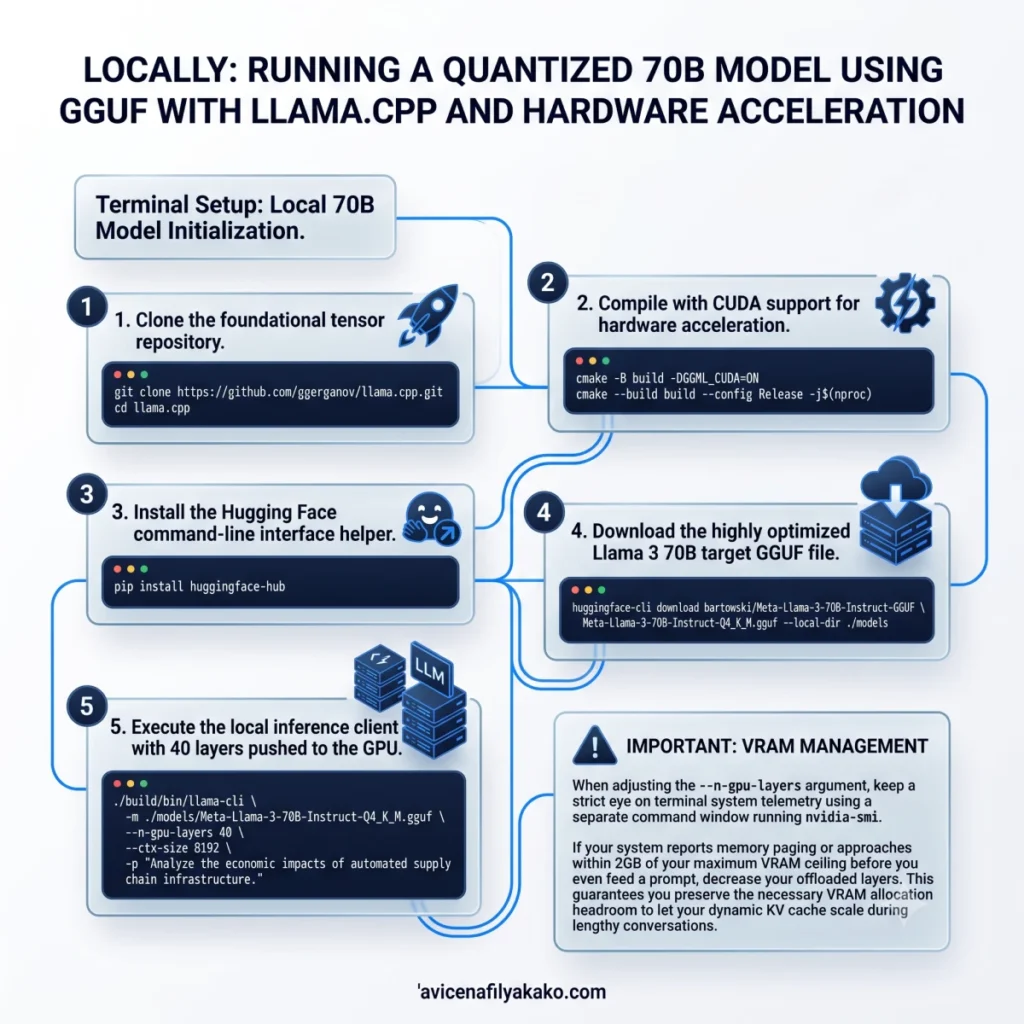
To run a quantized 70B model using GGUF on your machine, you need to compile llama.cpp with native hardware acceleration enabled. The following terminal sequence pulls down the framework, compiles it with CUDA compilation flags, handles your model download, and initializes execution with strict layer offloading bounds.
Local 70B Model Initialization
1. Clone the foundational tensor repository
git clone https://github.com/ggerganov/llama.cpp.git
cd llama.cpp
2. Compile with CUDA support for hardware acceleration
cmake -B build -DGGML_CUDA=ON
cmake --build build --config Release -j$(nproc)
3. Install the Hugging Face command-line interface helper
pip install huggingface-hub
4. Download the highly optimized Llama 3 70B target GGUF file
huggingface-cli download bartowski/Meta-Llama-3-70B-Instruct-GGUF \
  Meta-Llama-3-70B-Instruct-Q4_K_M.gguf --local-dir ./models
5. Execute the local inference client with 40 layers pushed to the GPU
./build/bin/llama-cli \
  -m ./models/Meta-Llama-3-70B-Instruct-Q4_K_M.gguf \
  --n-gpu-layers 40 \
  --ctx-size 8192 \
  -p "Analyze the economic impacts of automated supply chain infrastructure."
When adjusting the --n-gpu-layers argument, keep a strict eye on terminal system telemetry using a separate command window running nvidia-smi. If your system reports memory paging or approaches within 2GB of your maximum VRAM ceiling before you even feed a prompt, decrease your offloaded layers. This guarantees you preserve the necessary VRAM allocation headroom to let your dynamic KV cache scale during lengthy conversations.
Local Quantization FAQ
Can I run a 70B model on a standard consumer laptop?
Yes, you can run a 70B model locally using the GGUF format provided your laptop has at least 32GB of unified or system memory. By leveraging CPU offloading in llama.cpp, you split the execution layers across your system RAM and dedicated GPU, though your token generation speed will be bound by your system’s memory bandwidth.
Does 4-bit quantization significantly degrade model intelligence?
No, 4-bit quantization does not cause a noticeable drop in core logical reasoning or code generation performance. Empirical tests on Llama 3 70B show that a Q4_K_M quantization level only causes a 1.5% relative increase in perplexity compared to the full unquantized FP16 version, making the difference negligible for practical deployment.
Why does my local model crash with an OOM error after a long conversation?
Your model crashes because the key-value (KV) cache grows linearly with your context length and eventually exhausts your remaining VRAM. While the base weights of a quantized model occupy a fixed amount of memory, an extended context window can add over 8GB of runtime data, requiring you to reserve explicit VRAM headroom before launching.
Local execution of large language models completely alters how developers build applications. It removes subscription fees and ensures complete data privacy. But to reliably deploy a local 70B model on consumer hardware, you have to look past simple weight file sizes. Prioritize your context requirements, calculate your dynamic memory overhead first, and set conservative layer splitting parameters.
Disclaimer: The information provided in this article is for educational and general informational purposes only and should not be construed as professional advice (such as legal, medical, or financial). While the author strives to provide accurate and up-to-date information, no representations or warranties are made regarding its completeness or reliability. Any action you take based on this information is strictly at your own risk.