
An Obsidian AI knowledge graph pairs your Markdown vault with a local embedding model that maps notes by meaning, then surfaces related notes you can link. Tools like Ollama and the Smart Connections plugin run this on your own machine. The AI suggests the connections; you decide which links are worth keeping.
Traditional note-taking is a compounding tax on your attention. You capture an insight, manually categorize it, and link it to an existing topic. But as your vault grows past a few hundred notes, the manual Zettelkasten framework cracks. You forget what you wrote six months ago, creating structural silos where valuable ideas go to die.
Building a digital second brain shouldn’t feel like maintaining a legacy database. By integrating local AI models directly into your workflow, you can shift from manual curation to an AI-assisted knowledge graph. This approach builds on semantic search rather than replacing it. Instead of only querying your notes, you use AI to surface non-obvious thematic links across separate domains, then turn the ones that hold up into new atomic notes.
Why Manual Note-Linking Fails at Scale
The classic Zettelkasten method relies heavily on disciplined, manual execution. You read, extract an atomic thought, and deliberately find an anchor note to link it to. It works perfectly in a small sandbox.
However, human memory has strict processing limitations. When you add a new note about market psychology, you might not recall a highly relevant framework from a behavioral economics paper you summarized two years prior. The connection is lost. The graph becomes fragmented, relying entirely on your immediate cognitive recall at the exact moment of entry.
Obsidian users have debated this limit for years. In a long-running thread on personal knowledge graphs that began in 2023, contributors argue that plain links say nothing about how two notes relate, and some point out that the graph becomes hard to traverse when tags are overused. Without a layer that understands what your notes are about, the graph view looks impressive but does little for active synthesis.
The Architecture of an AI-Augmented Vault
To fix this, we introduce local intelligence. An AI-powered Knowledge Graph uses local vector embeddings and specialized large language models to analyze your entire vault simultaneously. It reads the contextual meaning of your text, not just exact keyword matches.
-
Markdown database
Capture a note
Plain Markdown in your Obsidian vault
-
Embedding engine
Embed it locally
A local model turns the text into a vector
-
Embedding engine
Compare by meaning
Distance between vectors shows which notes are related
-
AI agent layer
Suggest related notes
A plugin or prompt surfaces candidate links
-
You
Review and link
Keep the links that hold up, write new atomic notes from them
This setup relies on three distinct layers working together within your local environment:
- The Markdown Database: Your core Obsidian vault, remaining completely open, future-proof, and under your local control.
- The Vector Embedding Engine: A local utility that translates your prose into high-dimensional geometric coordinates based on semantic meaning.
- The AI Agent Layer: Large language models processing your text to execute specific cognitive tasks, such as generating automated summaries, extracting entities, or suggesting structural links.
This exact mathematical mapping is what allows you to build a personal RAG system for PDF library search, extending your local intelligence beyond short notes to massive, unstructured external documents.
Technical Comparison: Manual vs. AI-Driven Knowledge Management
| Feature / Workflow | Traditional Zettelkasten | Local AI Knowledge Graph |
|---|---|---|
| Link Discovery | Manual recall; limited to immediate memory. | Automated semantic mapping via vector proximity. |
| Contextual Retrieval | Strict keyword matching and tag reliance. | Natural language queries understanding abstract intent. |
| Synthesis Speed | Slow; requires manual cross-referencing. | Rapid; AI agents compile themes across hundreds of files. |
| Scalability | Decreases in utility as vault volume increases. | Increases in utility as data density grows. |
Step-by-Step Guide: Implementing AI Agents in Obsidian
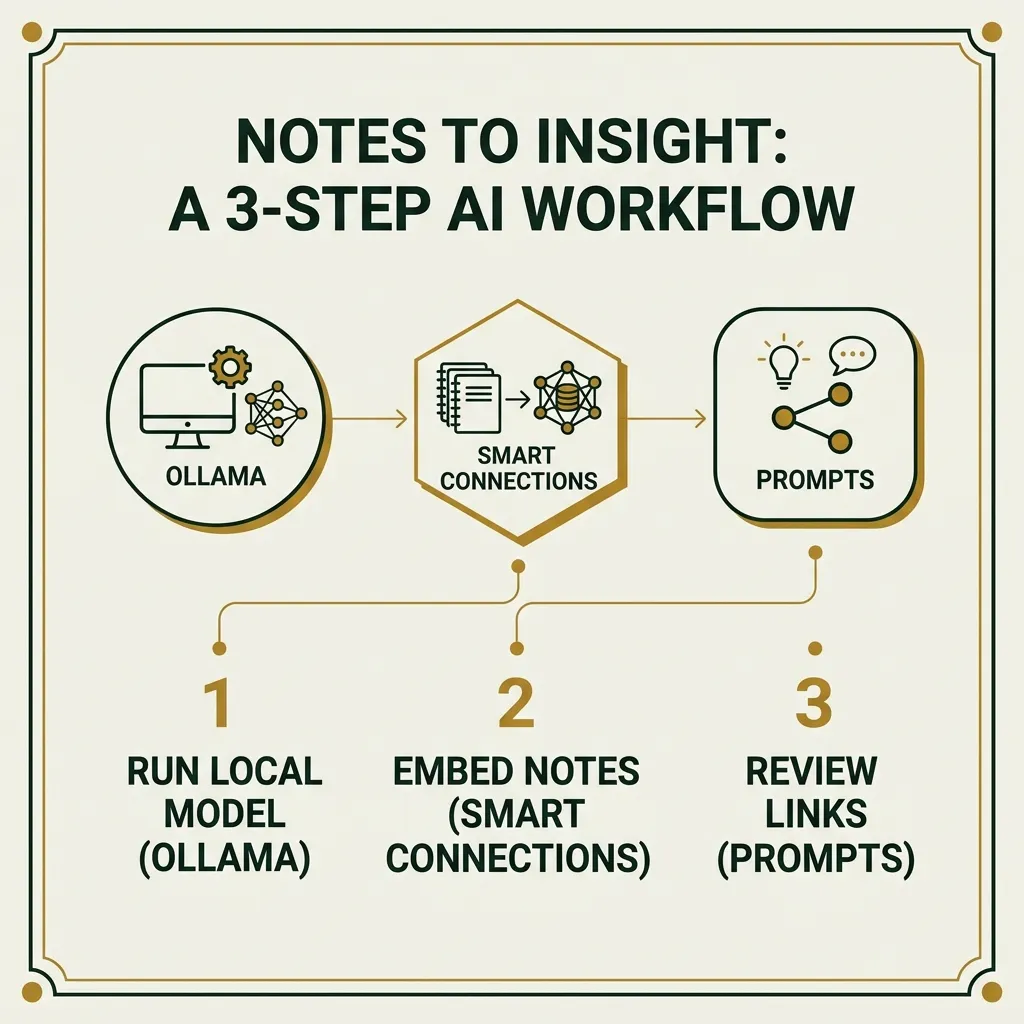
Building this ecosystem requires moving past basic chat interfaces. You need to configure your environment to proactively assist your creative and analytical output.
1. Establish the Local Foundation
Avoid routing your private thoughts through external corporate APIs. Use an application like Ollama to run models locally on your hardware. For general reasoning and link review, a small open-weight model from the Ollama library is enough. Pick the largest one your hardware runs comfortably, and check the library for current releases, since recommended models change every few months. Before committing to a specific stack, it is worth evaluating a Python vs No-Code AI assistant development approach to determine which infrastructure best fits your technical comfort level and workflow goals.
2. Configure Vector Embeddings
Install a community plugin designed for deep vault integration, such as Smart Connections. Once activated, it creates embeddings locally by default, with no API key required. These embeddings form a geometric map of your knowledge, measuring the distance between concepts to judge how closely they relate. Its Connections view then lists semantically related notes for whatever note you have open. It suggests links rather than writing them: you drag a result into your note to create the link.
3. Deploy Generative AI Prompts
Instead of asking open-ended questions, build targeted system prompts for your AI workflows. Use structured instructions to force the model to look for non-obvious cross-discipline connections. Run these prompts in a chat plugin that can search your vault, such as Copilot for Obsidian or Smart Chat, which is now a separate plugin from Smart Connections.
Markdown:
System Prompt: You are a structural analysis agent working inside my personal knowledge graph. Analyze the current active note. Scan the vector database for notes that share underlying structural frameworks but use completely different industry terminology. Suggest exactly three notes to link, with one sentence each explaining the shared framework.
Scott Bell describes a similar setup on My Year in Data: four narrow agents, each with one job, from vault linting to retrieval over his notes, and he still checks their output before trusting it. Narrow scope doesn’t stop a model from hallucinating, but it makes mistakes easier to spot. For a structured way to run that check, chain-of-verification prompting works well on link suggestions.
Moving Beyond Search to Active Synthesis
True information gain happens when your system surfaces insights you didn’t explicitly ask it to find. When you open a note, your AI components should immediately display a sidebar of semantically close notes.
Imagine reviewing notes on high-yield dividend investing strategies. A pure keyword system would pull up other finance articles. A semantic, AI-driven vault, however, might surface a note on biological feedback loops or network stability principles from software engineering.
Dividend Growth Investing
Stock Analysis · Portfolio Yield
Same topic, obvious linkBiological Feedback Loops
Different field, shared structure: gains that reinforce themselvesBy using AI agents to actively look for these parallels, your note-taking becomes an engine for original thought. The system uncovers the underlying patterns connecting your disparate business, legal, and creative projects.
Limitations and privacy considerations
An AI-assisted vault is useful, but it has real trade-offs worth knowing before you build one.
- Similarity is not relevance. Embeddings flag notes that sound alike, not ideas that genuinely connect. Review every suggestion before you link it.
- Local means slower. On a modest laptop, indexing a large vault and generating responses can take noticeably longer than a cloud model.
- Plugins change. Features move between plugins and between free and paid tiers, so check each plugin’s current documentation before committing to a workflow.
- Private is not the same as compliant. Indonesia’s Personal Data Protection Law (Law No. 27 of 2022) excludes processing by individuals for purely personal or household activities under Article 2(2), and the EU GDPR has a similar household exemption. Once your vault holds client or employer data, that exemption likely stops applying. Local processing keeps data off third-party servers, but it does not remove your obligations for handling it.
For more practical AI workflows, browse the AI Insight section.
Frequently asked questions
How do I use AI in Obsidian?
Install a community plugin that connects your vault to a language model. Smart Connections finds related notes using local embeddings, while chat plugins such as Copilot for Obsidian or Text Generator let you prompt a model about your notes. Each can run on a cloud API key or on a local model served through Ollama or LM Studio.
What is the difference between a knowledge graph and a vector database?
A knowledge graph stores explicit relationships between items, such as a link from one note to another or a typed connection like “contradicts”. A vector database stores each item as a numeric embedding and finds items with similar meaning by measuring the distance between them. In Obsidian, embeddings suggest candidate links, and the links you accept form the graph.
Does Obsidian AI require an internet connection?
No, as long as every part runs on your machine. With models served by Ollama or LM Studio and a plugin that embeds notes on your device, your note content stays local. You still need a connection to download models and plugins, and any feature routed through a cloud API sends note content to that provider.
Can AI automatically link notes in Obsidian?
Mostly it suggests rather than links. Smart Connections shows semantically related notes for the note you have open, and you drag a result into your note to create the link. Some plugins and agent setups can write links or metadata for you, but reviewing them first keeps weak connections from cluttering your graph.
An AI-driven personal archive succeeds when you treat the machine as a collaborative partner rather than a simple filing cabinet. Stop spending hours manually manicuring tags and folders. Focus instead on capturing high-quality atomic notes, and let local embedding engines handle the structural mapping.
The value of your vault isn’t measured by how cleanly it is organized. It is measured by how quickly it surfaces non-obvious insights when you are solving a problem. Let algorithms find the hidden bridges so you can focus entirely on doing the actual thinking.
Disclaimer: The information provided in this article is for educational and general informational purposes only and should not be construed as professional advice (such as legal, medical, or financial). While the author strives to provide accurate and up-to-date information, no representations or warranties are made regarding its completeness or reliability. Any action you take based on this information is strictly at your own risk.
Comments are closed.